DRW-Based Outlier Rejection
What is a Damped Random Walk?
The first step of the pyPetal pipeline is to perform outlier rejection on the input light curve data. This can be done by assuming a certain model for the light curves, fitting them to said model, and rejecting points a certain number of \(\sigma\) away from the mean fit.
Note
We follow the description of the DRW parameters (and CARMA models in general) from [Jones and Ackerson, 1990] and [Kelly et al., 2014].
One of the popular models used for AGN light curve data is the Damped Random Walk (DRW) model. This Gaussian process model has a kernel of the following form:
\(k(t_n, t_m) = \sigma_{\rm DRW}^2 \exp\left( |t_n - t_m| / \tau_{\rm DRW} \right)\)
with the two DRW parameters: \(\sigma_{\rm DRW}\) and \(\tau_{\rm DRW}\).
We can also add a noise (jitter) term to the kernel to account for additional noise:
\(k(t_n, t_m) = \sigma_{\rm DRW}^2 \exp\left( |t_n - t_m| / \tau_{\rm DRW} \right) + \sigma_n^2\)
This produces a power spectral density (PSD) of the following form:
\(P(f) = \frac{4 \sigma_{\rm DRW}^2 \tau_{\rm DRW}}{1 + (2\pi f \tau_{\rm DRW})^2}\)
[1]:
import matplotlib.pyplot as plt
import numpy as np

tau = 250
sigma = .2
freqs = np.logspace(-5, 0, 1000)

psd = 4*(sigma**2)*tau / ( 1 + (2*np.pi*freqs*tau)**2 )


fig, ax = plt.subplots()

ax.loglog(freqs, psd, zorder=100)
ax.axvline( 1/tau/2/np.pi, color='gray', ls='--')
ax.axhline( 4*(sigma**2)*tau, color='gray', ls='--')

ax.text( 2, 4*(sigma**2)*tau, r'$4 \sigma_{\rm DRW}^2\tau_{\rm DRW}$', fontsize=13, va='center' )
ax.text( 1/tau/2/np.pi, 120, r'$(2 \pi \tau_{\rm DRW})^{-1}$', fontsize=13, ha='center')

ax.set_ylabel('Power', fontsize=16)
ax.set_xlabel('Frequency', fontsize=16)
plt.show()
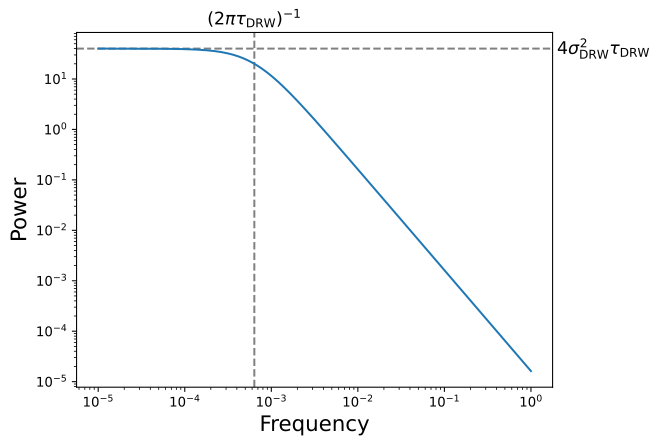
From this, we can see that \(\tau_{\rm DRW}\) is a characteristic damping timescale, and \(\sigma_{\rm DRW}\) is related to the magnitude of long-term variability.
We can fit a given light curve to the DRW model using two important softwares: the fast Gaussian process solver celerite [Foreman-Mackey et al., 2017], and the MCMC sampler emcee [].
These can find the posterior distributions for the two (or three) DRW parameters, predict the light curve at an arbitrary (and likely higher) cadence, and sample the posterior using MCMC.
DRW Rejection Arguments
As shown in the quick-start tutorial, we can use the DRW rejection module by simply setting run_drw_rej=True. However, this uses the default values for the parameters for the module, which may need to be changed to fit the needs of a given type of analysis.
There are a anumber of arguments that we discuss here, but can also be found in the API documnentation:
MCMC options
nwalkers: The number of walkers to use in the MCMC sampler. The default is 32.nburn: The number of burn-in steps to use in the MCMC sampler. The default is 300.nchain: The number of steps to use in the MCMC sampler. The default is 1000.
DRW options
jitter: If the jitter term should be included in the DRW model. The default isTrue.clip: IfTrue, the lower bound on the prior will be the mean cadence of the light curve without cadences \(< 10^{-8}\). This can be specified as a list of values corresponding to each light curve. If one value is given, it will be assumed for all light curves. The default isTrue.
Rejection options
nsig: The number of \(\sigma\) away from the mean fit to reject points. The default is 3.reject_data: If the data should be rejected, and the outliers should not be used for the rest of the pipeline. Similar toclip, this is specified as an array, one for each light curve, or one value for all light curves. The default is to reject for the continuum (i.e. first) light curve, but not the rest.
Note
If reject_data=True for a given light curve, a new file will be saved in output_dir without the outlier points included.
Warning
If reject_data=False for a given light curve, it will not be fit to a DRW, and no diagnostic information will be produced.
Miscellaneous options
use_for_javelin: If the fit to the DRW parameters (\(\sigma_{\rm DRW}, \tau_{\rm DRW}\)) should be used as fixed input parameters for the JAVELIN module. Default isFalse.
Note
Only the fit to the continuum (first) light curve will be used as input to the JAVELIN module.
An Example Output Plot
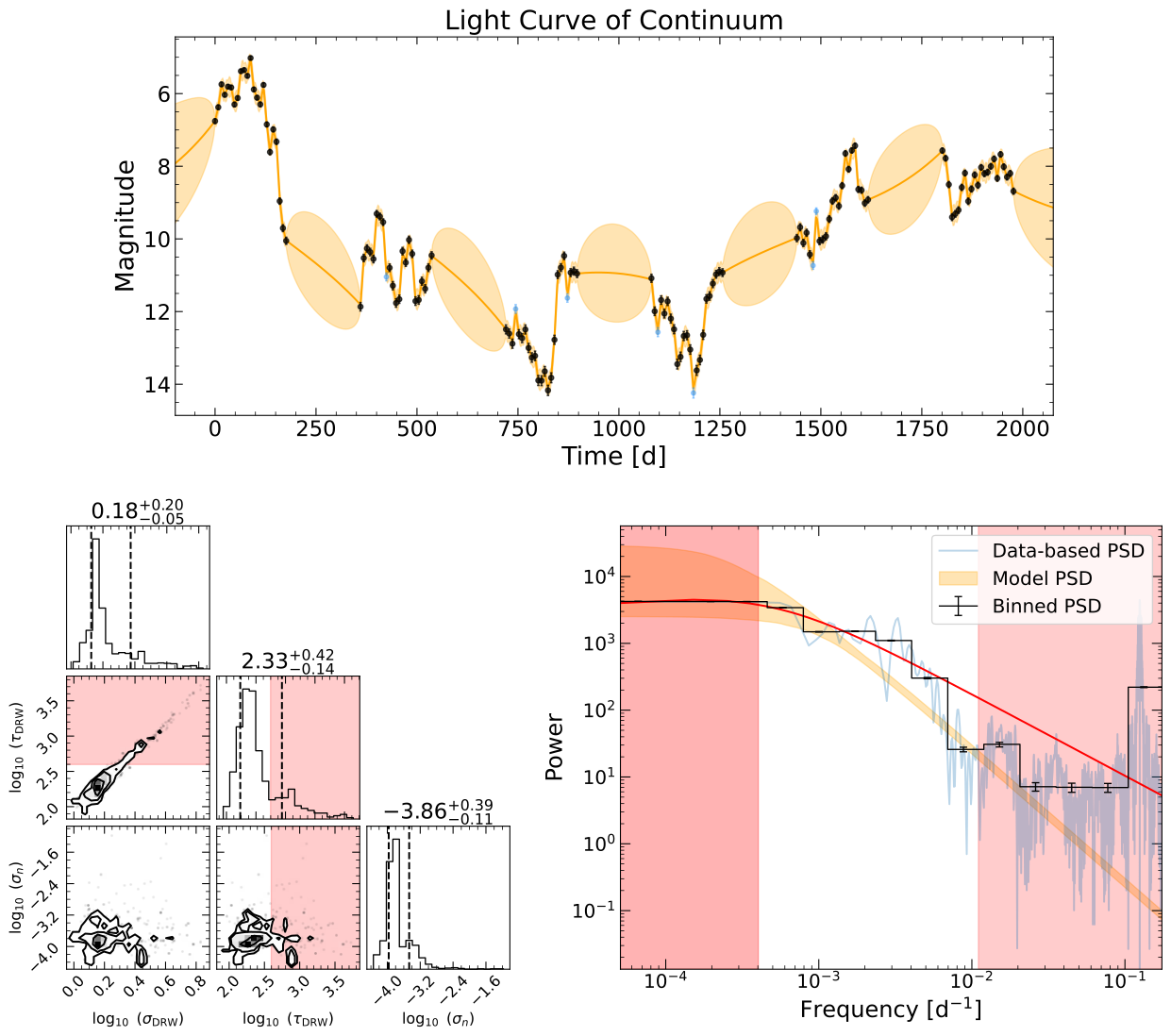
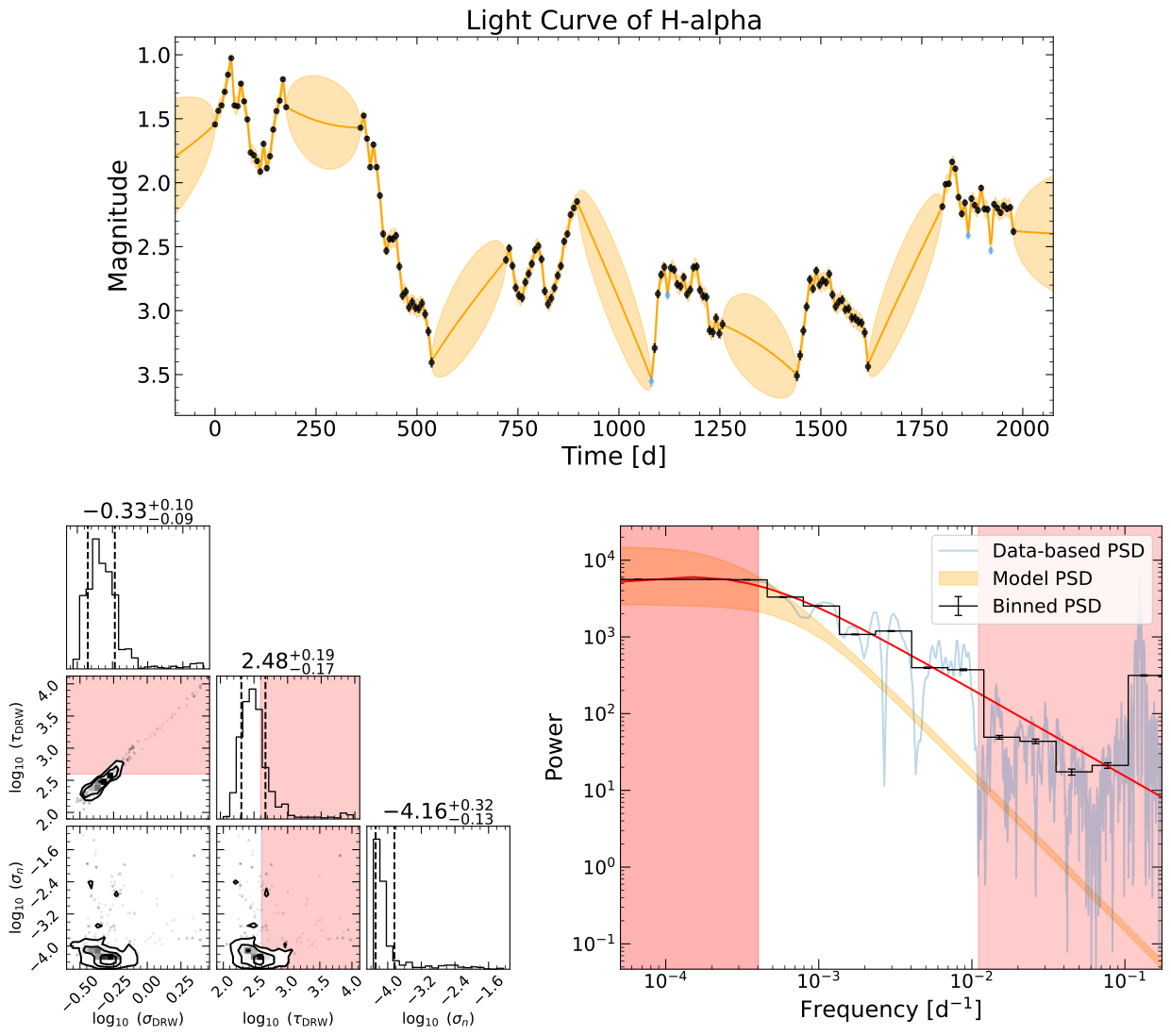
Each light curve will produce a DRW fit, and a corresponding figure. Each figure will have three different subplots within it:
The top panel will have the original plot and the DRW fit shown in orange. The mean of the fit will be in darker orange, and the \(1\sigma\) uncertainty will be shaded above and below the mean in a lighter orange. Rejected points will be shown as a light gray, while other points will be black.
The lower left will have a corner plot, showing contours of the MCMC samples of the posteriors for the DRW parameters. The histograms and contours will be shaded red where the \(\tau_{\rm DRW}\) is greater than 10% of the baseline (total length) of the light curve.
The lower right will be a figure containing the PSD of the data from a variety of different methods:
The light orange-shaded PSD is from the
celeriteDRW fit, which represents the 16-84% of the PSD.The light-blue line represents the data-based PSD, which is the Lomb-Scargle periodogram.
This data-based PSD is then binned logarithmically in frequency to give the black lines and uncertainties.
This binned PSD will then be fit to a doubly-broken power law, shown as a red line.
Like the corner plot, the figure is shaded red where \(1/f\) is greater than 10% of the baseline, but also where \(f\) is less than the minimum cadence between data points in the light curve.
There will be a red arrow pointing to the median \(\tau_{\rm DRW}\) from the fit, and a horizontal red line underneath it showing the \(\pm 1\sigma\) uncertainty.
Using the Module
Now that we know the arguments, we can run the DRW rejection module in a more customized way.
We can input the custom parameters in a dictionary, with the drw_rej_params argument:
[2]:
import pypetal.pipeline as pl

main_dir = 'pypetal/examples/dat/javelin_'
filenames = [ main_dir + 'continuum.dat', main_dir + 'yelm.dat', main_dir + 'zing.dat' ]

output_dir = 'drw_rej_ouput/'
line_names = ['Continuum', 'H-alpha', 'H-beta']
[3]:
params = {
    'nwalker': 10,
    'nburn': 50,
    'nchain': 100,
    'jitter': True,
    'nsig': 0.5,
    'reject_data': [True, False, True]
}

res = pl.run_pipeline( output_dir, filenames, line_names,
                       run_drw_rej=True,
                       drw_rej_params=params,
                       verbose=True,
                       plot=True,
                       file_fmt='ascii',
                       time_unit='d',
                       lc_unit='mag')
Performing DRW rejection
------------------------
jitter: True
nsig: 0.5
nwalker: 10
nburn: 50
nchain: 100
clip: array
reject_data: [True, False, True]
use_for_javelin: False
------------------------
DRW Rejection Output Files
The DRW Rejection can have a number of outputs, which depends on the number of light curves input to the pipeline. Each light curve’s directory will have a subdirectory labeled “drw_rej”, which will contain all output information.
This subdirectory will contain the following files, where (name) is the name of the light curve:
(name)_chain.dat: The MCMC chains for the DRW parameters.(name)_drw_fit.dat: The predicted light curve from the DRW fit, containing the times, mean fit, and \(1\sigma\) fit uncertainty.(name)_mask.dat: The mask for the DRW rejection, whereTruecorresponds to a point being rejected.(name)_drw_fit.pdf: The output summary figure for the DRW fit.
In the light_curves subdirectory, each light curve file will have a fourth column, which is the mask for the DRW rejection. This will be True for points that are rejected, and False for points that are not rejected.
If reject_data=True for any light curve, there will also be a processed_lcs subdirectory, containing the light curves without rejected points. The light curves with reject_data=False will also be saved, but with all points. These light curves will be used for the rest of the pipeline.
Note
If reject_data=Truefor a given light curve and run_detrend=True, the light curve without rejected points will be detrended. Afterwards, the detrended light curve will overwrite the processed light curve in processed_lcs.
If reject_data=False for a given light curve, the DRW fit will not be performed, and no output files will be produced.
DRW Rejection Output Dict
The DRW Rejection module will output a number of different data products from the analysis it has performed in a dict. This will be stored in the total output dict under the key drw_rej_res.
This output dict will contain the following keys:
masks: A list of the DRW rejection masks, one for each light curve.reject_data: A copy of thereject_dataargument.taus: A list of the MCMC samples for \(\tau_{\rm DRW}\).sigmas: A list of the MCMC samples for \(\sigma_{\rm DRW}\).jitters: A list of the MCMC samples for the jitter term. Ifjitter=False, this will beNone.
Note
The taus, sigmas, and jitters will be lists of MCMC samples for each light curve. If reject_data=False for a given light curve, the entry in that list will be None.